As AI reshapes data center power and thermal profiles, one thing is clear: air cooling alone can’t keep up. Rack densities are surging past 30kW, often reaching 100kW or more, and facility operators must face a choice: continue retrofitting an aging system or switch to liquid cooling. But for operators facing their first liquid cooling deployment, this shift prompts new questions.
This guide walks you through how to migrate from air to liquid cooling, from the rationale to architecture, helping data center leaders confidently transition from pilot to production.
Step 1: Why It’s Time to Migrate
With the acceleration of AI adoption, that era is quickly coming to an end.
Once limited to high-performance computing (HPC) and hyperscalers, liquid cooling is now on the roadmap for banks, colocation facilities, and enterprise data centers alike. Grand View Research projects liquid cooling will reach 17.77B by 2030, with direct liquid cooling dominating the market share with over 68% in 2024. This shift is driven not just by performance, but by efficiency and long-term cost control.
But this shift isn’t super surprising. Water has always been the superior heat transfer fluid—technically, that hasn’t changed. What has changed is how the industry views barriers to liquid cooling adoption thanks to the urgency of AI. Today, the explosive growth of AI workloads has reframed those concerns as calculated trade-offs in the race for greater efficiency, density, and performance at scale. For many, the question is no longer if they’ll make the switch, but when.
Step 2: Evaluate Liquid Cooling Technologies
Direct-to-Chip (D2C) Cooling
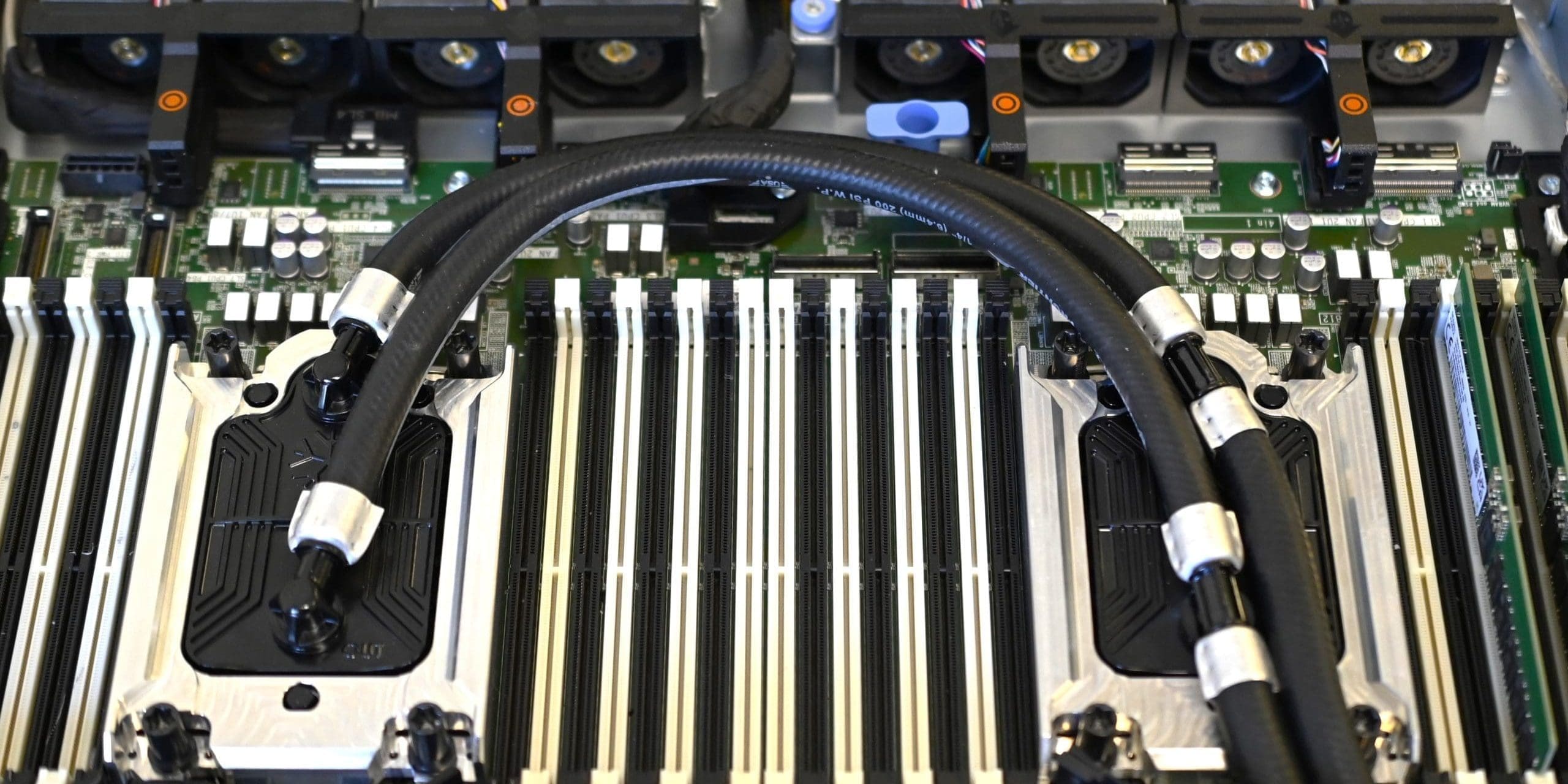
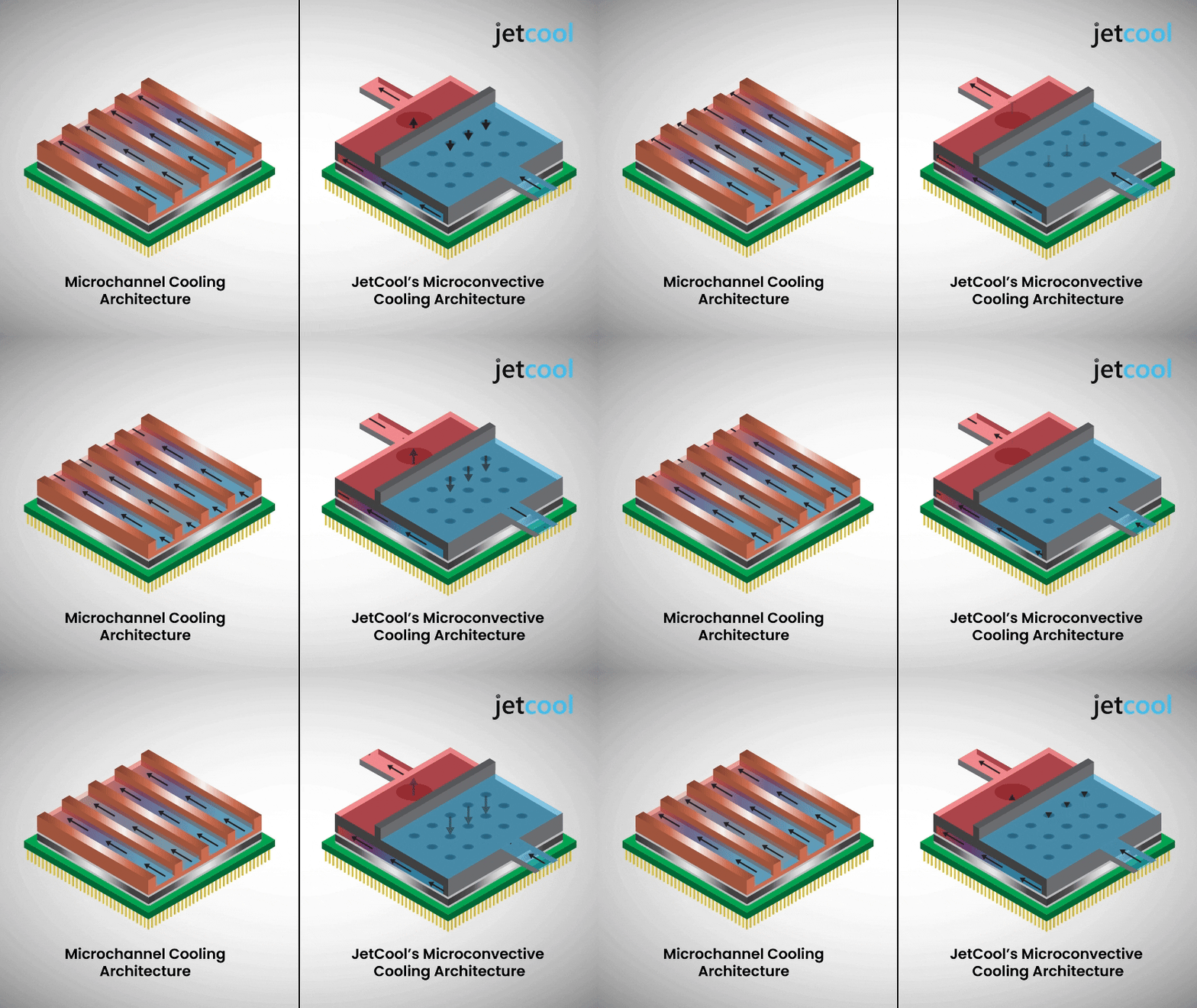
Cold plates are the most common technology behind D2C systems, but there are multiple ways to architect them and route fluid to the processor lid. Each design comes with its own set of trade-offs in terms of performance, integration complexity, and scalability.
Microchannel Cooling
Microconvective Cooling®
Single-Phase Immersion Cooling
Two-Phase Immersion Cooling
Matching Cooling to Density
- <20 kW/rack: Air cooling solutions are typically sufficient alone.
- 20-50 kW/rack: Liquid-assisted air-cooling solutions become necessary and more efficient.
- 150 kW+/rack: Advanced liquid cooling at rack-level integration is essential.
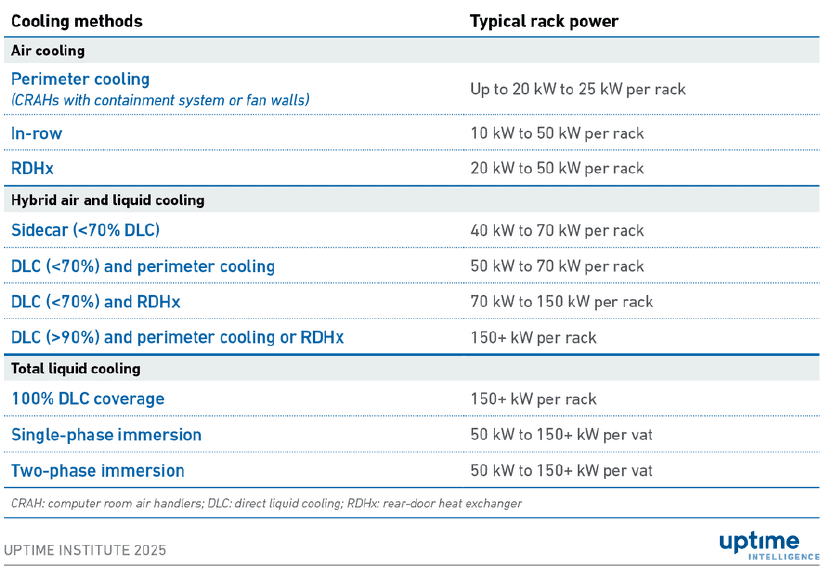
Rahkonen, T. (2025, February 4). AI and cooling: methods and capacities. Uptime Intelligence. Retrieved from https://intelligence.uptimeinstitute.com/resource/ai-and-cooling-methods-and-capacities
Selecting the right technology ensures operators can maximize compute per floor tile while extending server life and reducing operational expenses (OpEx), a critical balance given the capital expense (CapEx) of high-performance AI servers.
Step 3: Understand Deployment Options – Start Small
Liquid-Assisted Air Cooling
This plug-and-play solution delivers the core advantages of liquid cooling—such as improved power efficiency and higher compute density—while maintaining the simplicity of an air-cooled setup. It enables faster deployment, reduces upfront investment, and maximizes performance per square foot, making it an ideal entry point for enterprises, colocation facilities, and edge environments alike.
Liquid Cold Plates and Coolant Distribution Units (CDUs)
At the facility level, CDUs enable customers to achieve ultra-high rack densities—some reaching up to 300kW and beyond—by utilizing warm inlet coolants (up to 60°C), which helps maximize processor performance and efficiency.
Coolant distribution units come in several configurations:
- In-rack CDUs are mounted within the IT rack, typically at the bottom, top, or side of the rack enclosure. Ideal for ultra-high-density environments with limited floor space, where localized cooling is essential.
- In-row CDUs are positioned adjacent to IT racks in the same aisle, typically housed in their dedicated enclosures. Suitable for edge data centers or mid-sized deployments where rack densities vary but localized control is still desired.
Direct-to-Die Cooling Modules
This technology can be further advanced by embedding the cooling architecture directly into the chip substrate. These integrated semiconductor solutions represent a critical leap forward, enabling compatibility with increasingly diverse architectures—including multi-die and vertically stacked designs.
Vertically Integrated Rack Solutions
Cost Considerations
Deployment Type | Cost ROI | Notes |
Liquid-Assisted Air Cooling | Low CapEx, Immediate Time-to-Value | Excellent for retrofit; minimal disruption |
Cold Plates and CDUs | Moderate CapEx, faster TCO recovery | Ideal for greenfield deployments, high-density racks, and ESG initiatives |
Direct-to-Die Cooling | Moderate CapEx, longer development time | Best suited for deployments using processors exceeding 5kW in a single socket |
Vertically Integrated Solutions | Moderate CapEx, Fast ROI | Suited for large-scale, purpose-built data center with integrated systems with one vendor solutions simplifying service and warranty |
Step 4: Choosing Your Liquid Cooling Partner
Liquid cooling often blurs the traditional boundaries between IT and facilities in the data center. Components like pumps, manifolds, and coolant loops don’t fit neatly into legacy cooling models. In the article Hold the line: liquid cooling’s division of labor (June 2025), it notes “the conventional line of demarcation that divides the responsibilities of facilities and IT teams does not easily map to DLC equipment.” Without the right expertise, this ambiguity can stall deployments, introduce unnecessary risk and undermine long-term operational sustainability.
That’s why it’s important to find a partner who can:
- Own the full lifecycle—from design and deployment to long-term support and optimization.
- Bridge organizational silos, ensuring seamless coordination between IT and facilities teams.
- Architect tailored solutions for unique workloads and site constraints.
- Deliver global consistency, supporting deployments across regions with unified standards and service.
- Ensure operational sustainability, with proactive support and clear accountability.
In short, the right partner doesn’t just supply technology—they unify teams, accelerate timelines, and safeguard your investment.
Step 5: Plan Your Deployment in Phases
Start with a pilot. Define clear success metrics like PUE/WUE targets, chip temperatures, and delta-Ts. Use a representative workload to test the cooling setup in real conditions. Validate cold plate and CDU integration and monitor telemetry and coolant data to catch issues early. Make sure the pilot has a clear path to production—avoid getting stuck in “pilot purgatory.”
During deployment, collaboration is key. Liquid cooling often blurs the lines between IT and facilities. Clarify responsibilities to prevent delays. A strong partner provides not just the tech, but also support, warranties, and guidance to keep teams aligned.
Scale with consistency. Standardize rack configurations, SOPs, and telemetry systems to replicate success across sites. Your partner should be able to support you from pilot racks to full-scale deployments, locally and globally.
Maintain for the long haul. Build routine checks into operations—monitor coolant quality (or work with a partner that does this for you), pump performance, and chip temps. Schedule filter changes and system flushes. With the right partner, you’ll boost uptime, extend server life, and reduce OpEx while meeting the demands of AI and high-performance computing.
Conclusion: It’s time to plan your path
Whether you’re testing liquid cooling in a pilot or preparing to scale across your campus, the best way to get started is to talk with a partner who understands the full lifecycle of deployment.
Ready to start your transition to liquid cooling?
Contact JetCool to discuss your workloads, facility constraints, and deployment goals.